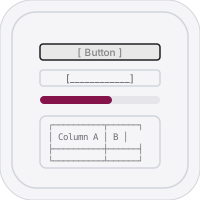
Sketch an interface out of characters.
Pick a component, click the grid to place it. ⌘Z / ⌘⇧Z to undo/redo.
This is the real engine — 20×12 of the app's 100×50 grid.
This is the real engine — 20×12 of the app's 100×50 grid.
Buttons, inputs, selects, tables, modals, navbars, tabs, breadcrumbs and more — placed as characters, not pixels.
Hover to preview exactly where a component lands on the 100×50 grid, then click to commit it.
Copy to the clipboard or save a .txt. It reads correctly anywhere a monospace font does.
Fifty steps of history, so experimenting costs you nothing.
A real SwiftUI app on iPhone, iPad and Mac, not a wrapped web page — same grid, same components as the web version.
No ads, no purchases, no accounts. The source is on GitHub.
The web version runs straight in the browser — nothing to download.
Blockframe runs on every platform. On Windows, Linux and Android it installs straight from the browser — no store, no download, no runtime. It gets a real window, its own icon, and keeps working offline.
Open the web app in Edge or Chrome, then Install Blockframe from the address bar. It lands in the Start Menu like any other app.
Open & install →Open the web app in Chrome, then Add to Home screen. Full screen, no browser chrome, works offline.
Open & install →Same as Windows — install the web app from Chrome or Chromium and it runs in its own window.
Open & install →